Tutorial
|
Game Memory Edit Tutorial by CreHx
CreHx Cheats - StarShip Ranger
v1.86 Tutorial - Part #1 of 4 NOTE: READER ALERT - This one is so easy it may bore the more advanced GameHacker, so easy in fact, that it's a possibility a new PC User may even pick it up quite quickly. (But I would never recommened that a new PC user to try this as there are many things to learn about MS Windows before hand) It's also best to know the basic's of Assembly Language.
Part #1:Status
- "Very Beginner Level", How to find
- Unlimited Lives" Starship Ranger v1.86 Unlimited Lives: 1. Start TSearch. Size up the TSearch window to your likeing, then continue on. 2. Run
StarShip Ranger v1.86 game. 3. Now
back in TSearch Now select the 1st magnifying glass under the open process button.
A Search box pops up: (Search type we need to do) Search: Exact Value OK <---- Click ok. 30,000+ addresses, now click "Ok" on top of that window box. 4. Now
go back to the game by clicking on the "StarShip
Ranger" on the task bar. 5. Now we want to click the 2nd magnifying glass. (we use the 2nd mag-glass from now on) Value: 2 <---- Make sure to put 2 for Value. (This is your new value of lives left) Click OK, alot less addresses will be found this time. Click ok.
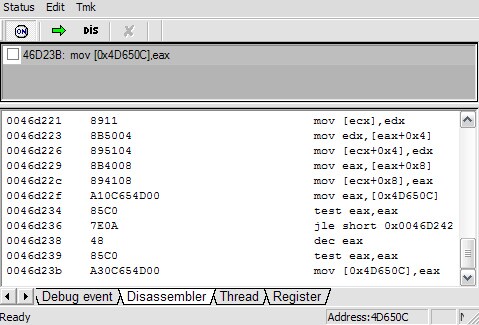
7. Back in TSearch, (you guesed it) 2nd mag-glass, and Value of (you guessed it again) 1 We now see 5 addresses listed (maybe you have more or less), and most of the time, the one that starts with a 4 is the one used to store what we need (most of the time, anyway) Since I know this address (4D650C) does not use DMA lets go back to the game. (If your using the same version of the game, this addy must be the same, unless it uses a different kind of DMA, I hope it's the same as I have, anyway it "should" be unless you have a different version of the game) 8. Loose the last Life and then, choose New Game, Episode 1. Now we have 3 Lives again. 9. Back in TSearch, we see those address, only one of them should have a 3, but go ahead and search using the 2nd mag-glass and search Value of 3 Great only 1, now that is our address we need. Click on it to select it, and click the little green plus button to add it to the other side of the TSearch window, or you could double-click on it to add it. Now the real fun begins: (When I refer to Tsearch we will be working with this from now on) Description - the little square there is so you can click in it to freeze (Lock) the value at 3 but, were not going to do that just yet, other part you can click inside of to give it a name such as LIVES Address - this display's the address, you can click inside of it to change it also, but we dont want to do that. Value - display the value of current lives, lets change this, click inside on the 3 and change it to 9, make sure that the cursor has no blink to it when your done so as to make it so. (After doing this you can go back to game and see this wonderful thing in action) Type - 4 Bytes, can be changed, but there is no need in that. Note: TSearch were going to call TS, from now on, because were going to have another window soon called AutoHack or AutoHack Window or AH for short, and the game Starship Ranger we'll call SR for short. Ok, at the top of TS click the Autohack menu option: click, Enable debugger Again, at the top of TS click the Autohack menu option: click, AutoHack window You will see that there is a top and bottom part to this window. (Size up and postion this window to your likeing, then continue on, you'll want it fairly wide) Now what we want to do is, go to TS and right-click on the LIVES we found, a menu will popup, at the bottom of this little menu select AutoHack.
Address Op-Codes Assembly instructions
In the bottom half of window, right-click the
top line and select Backward
mov [0x4D650C],eax EAX 2 lines above this one, is this line: So how do we stop this from decressing? Right-click on it, and choose: Nop this line Now it should look like this: 11. Go back to SR (the game) and loose a couple lives. You have succeeded in cheating the lives in this game !!! If you wanted to make a Trainer, this would be the address and opcodes to use. 46D238 48 If you were to use TMK 1.51 (Trainer Maker Kit) Unlimited lives: ON Poke 46D238 90 I wont be explaining how to use TMK thouh, there are more Tut's out there on that. Part
#2: Status - "Begginer Level",
How to find - "Unlimited Missiles" Starship Ranger v1.86 Unlimited Missiles: 1. Start TSearch. Size up the TSearch window to your likeing, then continue on. 2. Run StarShip
Ranger v1.86 game. 3. Now back
in TSearch Now select the 1st magnifying glass under the open process button.
A Search box pops up: (Search type we need to do) Search: Exact Value OK <---- Click ok. 4,000+ addresses, now click "Ok" on top of that window box. 4. Now go back
to the game. Unpause and fire the missiles 2 times.
You will see that each time you fire them off
it drops by 2. 5. Now we want to click the 2nd magnifying glass. Now we want to click the 2nd magnifying glass. (we use the 2nd mag-glass from now on) Value: 16 <---- Make sure to put 16 Click OK, alot less addresses will be found this time. Click ok. 6. Go back to SR (the game) and fire the missles 3 times. You should have 10 missles left 7. Back in TSearch, (you guesed it) 2nd mag-glass, and Value of (you guessed it again) 10 We now see 1 address listed. Since I know this address is DMA you will have a different address then I do, even if we have the same version of the game. Double-click on it, to add it to the right side. Now the real fun begins: Description - the little square there is so you can click in it to freeze (Lock) the value at 10 but, were not going to do that just yet, other part you can click inside of to give it a name such as MISSILES Address - this display's the address, you can click inside of it to change it also, but we dont want to do that. Value - display the value of current Missiles, you can change this value to 20 if you like make sure that the cursor has no blink to it when your done so as to make it so. (After doing this you can go back to game and see this wonderful thing in action) Type - 4 Bytes, can be changed, but there is no need in that. Note: TSearch were going to call TS, from now on, because were going to have another window soon called AutoHack or AutoHack Window or AH for short, and the game Starship Ranger we'll call SR for short. Ok, at the top of TS click the Autohack menu option: click, Enable debugger Again, at the top of TS click the Autohack menu option: click, AutoHack window You will see that there is a top and bottom part to this window. (Size up and postion this window to your likeing, then continue on, you'll want it fairly wide) Now what we want to do is, go to TS and right-click
on the MISSLES we found, a menu 8. Go back to SR, fire Missles once, pause, go back to AH (Autohack Window). 9. There should
be an Address in the top section, click once on
it. Now in the bottom half there should be the
game's program code. Address Op-Codes Assembly Instructions
In the bottom half of window, right-click the top line and select "Backward" you should then see something like this:
This time, what your really looking for is a
SUB (subtract) Let's look closely at this line:
What does this say (you might ask) "add ecx,-0x2" It says: "Add -2 to ECX" This is where ecx is decreasing. Believe or not there are 2 ways to stop this! You will notice these, Op-Codes: 83 C1 FE 1st way. You can Nop that line, and it'll work. We can change 1 byte instead of 3 Lets change this: 83C1FE Right click on this line:
And select Assemble Just replace the 2 with a 0 <-- Zero 10. Now you can go back to SR and fire off some Missiles Congrats, you have just made a cheat for Unlimited Missles. Trainer Codes: In order to understand an address of the byte to change, I give you this next example.
The byte FE is at address: 0043A4A0 If we could put each byte at a single address it would look like this 0043A49E 83 You may have to learn to count in hex to understand why A0 comes after 9F The address is counted in hex and the opcodes are also, it's actually just as easy to count 19 to 20, it works in simular the same way... BASE 16 and so on, and so on I give you this example: lets pretend 19 = 9F (We know it really doesn't)
          |------------- Address: 0043A49E <--9E
          |
          |  |---------- Address: 0043A49F <--9F
          |  |
          |  |  |------- Address: 0043A4A0 <--A0
          |  |  |
          |  |  |
0043A49E 83 C1 FE
So if we were to make a Trainer that would change 1 byte instead of 3 bytes We would use this: Missle Cheat ON: Poke 43A4A0 00 The above are for TMK (Trainer Maker Kit) Part #3: Status - "Intermediate Level", How
to find - "Unlimited Fuel" Starship Ranger v1.86 Unlimited Fuel: Note: Before doing this you should have unlimited lives turned ON (see part #1) so as to not have to start game over and risk loosing the address do to dma. Also, your fixing to have alot of work to do in this one. 1. Start TSearch. Size up the TSearch window to your likeing, then continue on. 2. Run StarShip
Ranger v1.86 game. 3. Now back
in TSearch (called TS from now on) Do your 1st search. (Make sure Type is set to 4 bytes) Search: Unknown Ok, then Ok 1,000,000+ addresses. Note: This may not be the "correct way" but, this is how I did it. (I might should have searched for a float value, but, ah-well...) 4. Now back to the game, Starship Ranger (called SR from now on) Let the Fuel be consumed for a second. Note: Stay away from fuel pads. Always remember to pause game. 5. Back in
TS 6. Back in
SR 7. Repeat steps
5 and 6 until you get low on fuel. 8. Back in
TS 9. Repeat step
5 10. Again,
repeat the steps 5 through 9 until you have less
then (I'll be here when you return) Note: Yes, GameHacking is alot of work sometimes, but I love it...I can say that Part #4 when we find the Energy will be alot more easy, except the CodeCave, which I plan on making it fun. 11. I'm about
to ask you something you may not wish to do, believe
me when I say I know it's a pain, but do the above
some more till When your ready let's continue... 12. Because of DMA even if we have the same version of the game the following address's you and I have may be different: Here is what I have. I have 16 Address's, yes, I'll list all16 + there values Address Value
Note: Your address's should be very close to what you see here, they may not be the same, but close to it. This tells us 1 very important thing, we should have searched for a Float or Double values, but needless to say, I could not locate the correct address, so I had to use "any means nessessary" to find my Cheat, lol. I know it's alot of work, and sometimes when you add an address to be autohacked it throws you out of the game, and you have to start all over again. The joys of being a GameHacker... ;) The above adrress's, you'll notice, follow in a sequence. It is a sure bet, that we only need the last one of this kind of thing, what I mean is the last address of a sequence. Example: (One of these, is the one we are looking for) (see above where marked with "*")
Note: "most" of the time, the one were looking for will start with a 4 or A (most of the time anyway)
To save you some time, let's AutoHack the one that starts with a "A" (Myself I would have 1st checked the one that had the 4 which I did already, it was not the one needed) Double click on it to add it to the right side
of TS window. A58F3A (Right-click, and "Autohack"
this!) 13. Back in SR loose a little Fuel, now pause, and..... 14. Now this is interesting: in the top half of this autohack window, click once on this instruction, in the bottom half right-click on the top line, and choose "Backward", you should see this, in fact you will see this.
*** This is the instruction that decrease's our fuel, we want to stop this from happening.
So right-click on the above line and choose "assemble" Change this: Now we see this:
D8AD78020000 - Opcodes of original. We changed the AD to 85 You can go back to SR and check out what happens to your Fuel... Cool eh ? 00438AFF - What comes after this address on this
single byte? Note: Please see Tutorial #2 for byte position example. Trainer codes: (a 1 byte Change!) Fuel Cheat ON - 00438B00 85 - Modified Value Part #4: Status - "Intermediate Level", How to find - "Unlimited Energy" Note's: Even when this says: "Intermediate
Level" I still try to make it easy for the
beginner... Things Needed: TCCT - Tsongkie’s Code Cave Tool Starship Ranger v1.86 Note: I must say, that I dont think you'll find another
tutorial, out there written like the way this
one is, I never did learn to use TSearch's Also, I am going to try, to make this so easy, that a flood of new GameHackers will rise from the shadows.. One could only hope... Unlimited Energy: Note: Before we begin, you might at least want to have unlimited lives. 1. Start TSearch. Size up the TSearch window to your likeing, then continue on. 2. Run StarShip
Ranger v1.86 game. 3. Now back
in TSearch (called TS from now on) For our 1st search: We have about a thousand addy's, now lets narrow this down... SideNote: The very 1st time I searched this I did an unknown value search, I learned soon enough that it started with this easy to search for value. 4. Back to
starship Ranger (SR from now on) 5. In TS do a next search for "Has decreased" 6. In SR crash and get a new ship, so your back at full energy. 7. Next search: Exact Value 100. We have 2 addy's to work with, so... 8. Back in SR, crash into 1 of the enemy ships, loose some energy. 9. In TS do next search for "Has Decreased". Now you should have 1 address, if not, repeat from step 6. Now that we have our address, we will need to
AutoHack this. I'll be here when you return.... 10. Now while you are AutoHacking this, you must play the game for a little bit. These will be the things you need to do: I'll be here when you return... 11. CodeCave
Info: We should see 4 addy's in the top of the AutoHack window. (AH from now on) Actually this one is all we really need: mov [esi+0x270],eax - This is what decrease's our energy, we want to stop this from happening. (To NOP this will NOT work) We just need to visually see, at least one of these:
These, are what makes our energy go back to being at full again. You will notice, we see: Now, here's what we need to do, in order to have full energy all the time:
But this will have too many opcodes to replace that 1st instrucion. The 64 you see is a value in hex, it equals 100 in decimal. I'm sure as you learn more ASM you'll be able to figure these things out on your own. (and it is hard at first, and I still hardly understand it myself, but I'm never going to give up - What I mean is, I understand some things, and I'm still learning new things). Do as I do, and we should succeed in this codcave... This is what you should see in the bottom half of the AH window, unless your using a different version of SR.
Now let's find a codecave to work with. 00010ABF - I choose this one. It's always best to have pencil and paper or notepad open to take notes and such... Now in order to create this codecave:
Notice these opcodes are 6(six) bytes 89 86
70 02 00 00 Now you should see something like this:
It has turned into 6 nop's Now right-click on this one and choose assemble
In this little box type in: jmp 0x00010ABF You will now see this:
That creates our jump to the codecave. Now for the CodeCave itself:
You should see this:
* Let's use this address as our codecave,
we will of course fix the jump we made a minute
ago to go here, in a few more moments... 00010add - This one looks good to me, we could have used 00010abf but as I said I like it a little furthur down. Right click this line and choose "Assemble"
Type in: mov dword ptr [esi+0x270],0x64 What this does is every time you get hit or crash it keeps your energy at 100 max no matter what. (Godmode like code) You now should see this:
* This is where we jump back to the original code Now right-click this line, and select "Assemble"
type in: jmp 0x0043AA62 Scroll up and check (in this document), the line we must go back to was the next instruction)
You should now see this:
Note: (I will mention something else that is important here in a little bit) We are done here, but we need to fix the 1st jump we created to get here. 00010add - This is the final address where the codecave starts, the 1st jump needs to be change so that it jumps to this. Now double-click this line:
Now right-click this line, and choose "Backward"
You should see this:
Right-click this 1st jump we made and fix the
address to the one we used. Choose "Assemble"
and change the BF to DD like so:
to this:
Now you should see this:
This Cheat is now complete... Important Note: Here are the address's and opcodes for this cheat:
When making a trainer do a codecave, create codecave first 1st, then create the jump to it. When trainer turns off the cheat, all it has to do is just replace the, modified with the original. Reading many more Tutorial's will help you to learn more. I tried to make this simple as I could, I hope it was easy and someone learns something, besides me being partly a newb myself after more then 2 years of learning this stuff... Well, this is my last part, of a 4 part tutorial. I hope you enjoyed it. A few words and insight, my thoughts: Thanx: To all in #gamehacking, CheatHappens,
and many more. Some do not eat, some have pizza, some do only
what they like... PS. I believe in SP (SinglePlayer) Cheats only. Contact: crehx.cheats@gmail.com |
|||||||||||||||||||||||||||||||||||||||||||||||||||||||||||||||||||||||||||||||||||||||||||||||||||||||||||||||||||||||||||||||||||||||||||||||||||||||||||||||||||||||||||||||||||||||||||||||||||||||||||||||||||||||||||||||||||||||||||||||||||||||||||||||||||||||||||||||||||||||||||||||||||||||||||||||||||||||||||||||||||||||||||||||||