Tutorial
|
INTRODUCTION: A trainer is a program written to intercept and alter the memory addresses of games that are running in the background. Usually trainers contain such features as GOD MODE, UNLIMITED LIVES and others that sometimes aren't pre-programmed into the game by its designers. Some people believe that creating a trainer
is extremely difficult and requires all kinds
of programming knowledge and skills. Not true.
Some very friendly tools have been created to
allow anyone to make their very own trainers for
their favorite games. In these tutorials, we'll
teach you the basics of how to get started and
give you step by step instructions on creating
trainers that you can follow along with on your
own.
A lot of people tend to think that making trainers is difficult. Well it’s not really, anyone who knows a few stuff about computers can learn how to make trainers. In this tutorial we’ll make an "advanced" trainer that uses DMA (Dynamic Memory Allocation). There are many cheat tools out there and one of the best is TSearch. We’re going to use TSearch v1.6. The game we’re gonna test is Abuse. First of all let’s take a look at TSearch. On the main screen there are some buttons and one of them is "open process" If you go there you will see all of the programs that are open. So let’s play Abuse, start a new game. Press Alt and Tab so you can go to the desktop. Go to TSearch and press the “open process” button. You will see "Abuse32.exe", left click it and press open. Above the toolbar you can see "Autohack".
Enable the Debugger and the Autohack window. Now below the "open process" button there are other buttons. One of them is called "Init new search".
Press this one (you can’t press the other ones anyway). Now I’m going to explain what all these options are… "Exact value" is used when you know the value you’re looking for (i.e. you have 20 bullets in your gun). "Range" is used when you know the value is between two numbers (i.e. you have 1-2 lives but you don’t really know). "Unknown value" is used when you don’t know the value you’re looking for (it’s used for energy bars mostly). Now I bet you’re wondering what all these bytes are. "1 byte" is used when the value can
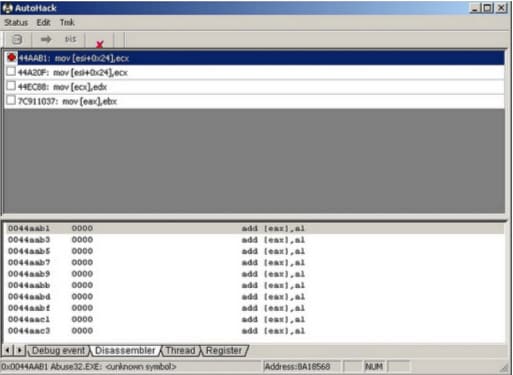
be between 0-255. "Float" is used when the value can be between 1.2E-38-3.4E38, it’s used for games like Zoo Tycoon and Age Of Empires. "Double" is used when the value can be between 2.2E-308-1.8E308, and personally I’ve never used it. Now that I explained that we can continue. We’re still on TSearch and we’re ready to search the memory for health. We’re going to use "exact value". Put 100 on the value box and "1 byte" on the type box. There are going to be many addresses so we have to do it again. Go back in the game and lose some health. Now go back to TSearch and press the "search next" button that is next to "init new search". The only thing you have to change is the value, put the current health. If there are still many addresses then you have to do it again until you have one-two addresses. Once you find the addresses (could be one which is better but it’ll most likely be two in this case) double click on the first one so that it’ll "transfer" to the table on the right and change the value to whatever you want (up to 100). Go back in the game and see if your health changed to the number you put on TSearch, if it did change then go back to TSearch and click on "autohack". If it didn’t change go back to TSearch delete the address you changed by selecting it and pressing the "X" button and transfer the second address to the table. Repeat the process (change the value, check go back in the game and back to Tsearch so you will click on "autohack"). Go back to the game and lose some health. Once you do that go back to the autohack window and you’ll see this:
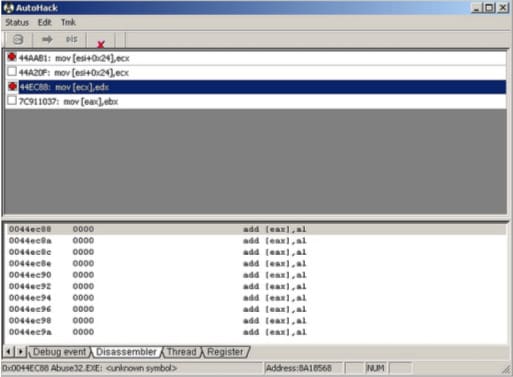
Now select the address and go to edit and patch it. Your health won’t decrease anymore. Now for the ammo. Check out what’s your ammo on one of the guns. Go to TSearch and search for a new address. On the value box put the amount of ammo you have. On the type box put 4 bytes. Do the same as we did with the health. In the end the address on the autohack windows should be like this:
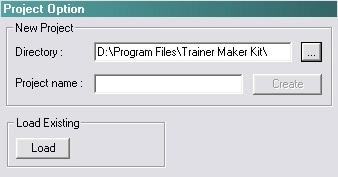
That’s all you have to do considering finding the addresses. We only have to do one more thing and then we’ll work on Trainer Maker Kit. Click on one of the addresses on the autohack window, go to tmk and then to button script (it’s the only option anyway). Copy this and open notepad so you can paste it, you have to remember if it’s the address for the health or the ammo. Do the same with the other address. Once you’re done you don’t need TSearch anymore. (NOTE: if you close TSearch the game will close too) Now let’s go make the trainer with Trainer Maker Kit. When you click the TMK icon you will be presented with this screen:
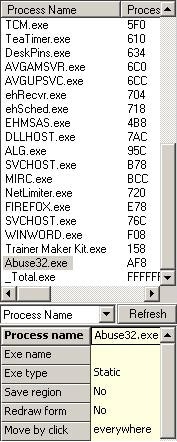
On the project name put "Abuse" and then press create. Directory shows you where your project is going to be saved. Load Existing is used when you already have saved a project and you want to continue making it. On the build settings you can choose the process name, in this case it’s "Abuse32.exe" (You can choose the window name instead if you want). You can only choose the process/window name when the game is open.
As you can see on the above picture under the process name there’s another option "exe name" where you can write the name of the trainer you’re making. "exe type" has two options: static and linked. I suggest you use static so that the user won’t have to search for any dlls on the net. I really don’t use “save region” and "redraw form", they are used for the background. The last option "move by click" has two more options: everywhere and caption. If you use everywhere you will be able to move the trainer by clicking anywhere on it and if you use caption then you will have to click on the caption to move it. You can see the dialog box on the right area, right click it and go to properties. Here you can edit the caption and do many other stuff. You can play around and see what you like. I use "title bar", "system menu" and "minimize box", it only depends on what you like and what you want to do. Once you’re done press close. We can only have four buttons here as we only found the health and ammo addresses. Don’t forget the "info" button and the "back to normal" button. Go to insert and click on button. You can add four buttons now if you want or you can add the other three later. Go to the properties of the first button and click on "write memory actions". Now open the file you saved the addresses from autohack. My first button will be for health. On the text file go where it says "patched script" and copy the address, go to TMK and paste it (Ctrl+v). Click on apply. Now go to the properties of the button and rename it to "Health". You can use a hotkey, change the colour or position, add a tool tip. Do the same for the "ammo" button. Now let’s make the "back to normal" button. Name the third button "normal" and go to the "write memory actions". Go to the text file where you saved the addresses and copy the unpatched script for health and paste it to TMK, press enter so you can go to the next line and then copy the other unpatched script for the ammo and paste it to TMK again. Press apply. Let’s go make the info button now. Name the button info and go to the "fct" tab in the properties. On the functions press "msg box", choose an icon and on the left side write your name/nickname/email, instructions and whatever you want to. On the objects screen you can edit many things. I would suggest playing a little with these options too. Once you have finished making the trainer go to file and save your project. Then you can build your trainer by going to build. You will find your trainer to the TMK directory. If you don’t understand something you can use the help file on TMK or email me. This tutorial is written by Sophie_Angel. Cheat
Happens is the only site that is allowed to post
this guide online. Email me if you want to post
it on your website. |